
The right event, the right email.
Receive an event from your application, apply your sending conditions and use Brevo to send a transactional email.
For teams in product, integration and customer relations.
The day-to-day need.
Business emails rely on rules scattered across services. Understanding why a message was sent requires reconstructing the event and the decision behind it.
- Scattered sending rules make it difficult to explain why a customer received an email.
- An event missing a recipient or of another type should not trigger the same send request.
- A successful email API response does not prove that the message was delivered.
Example: confirm an account activation
Your application sends an event when an account becomes active. Check the event type and recipient, send the Brevo confirmation template and record the provider response.
- Without a workflow
- Sending logic lives in several services and tracking depends on each service’s logs.
- With nodulz
- The event, condition, Brevo template and provider response are connected; unrelated events leave the path without an email.
How nodulz solves the problem.
nodulz makes the send decision visible before calling the provider. The workflow prepares template variables and records the API response to trace the request.
Filter incoming events
The webhook receives the event type and account data. The condition checks for an activation and an available recipient address; the false branch does not contact Brevo.
Keep the template with the provider
The Brevo node uses your template ID and personalization parameters. Brevo maintains the email content while nodulz orchestrates when to send it and which data to use.
Connect the response to the event
The PostgreSQL query records the event ID and provider response. A separate workflow can receive Brevo events to track delivery, bounces or later errors.
From trigger to outcome.
Webhook · Condition · Brevo · PostgreSQL
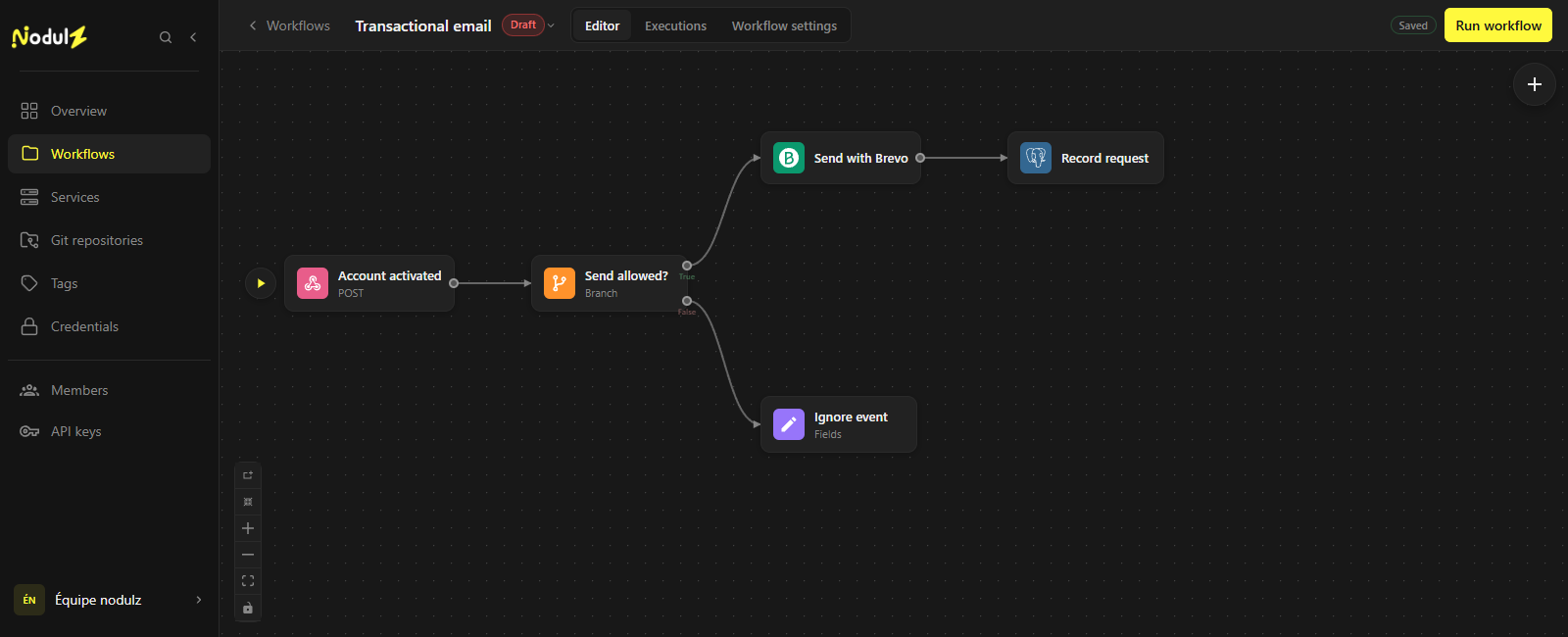
Email uses the allowed branch, then the request is recorded. Editor capture of an illustrative workflow that has not been executed.
Scroll the capture horizontally to follow the full workflow.
What happens at each step.
- 1
Account activated
Receive the event with its recipient and personalization parameters.
- Data used
- Event type, account ID, recipient and personalization parameters.
- What the step passes on
- The business event to examine.
- 2
Send allowed?
Check that the event matches the scenario and required fields are present.
- Data used
- Event type and required fields.
- What the step passes on
- True branch: prepare the email. False branch: ignore the event without sending.
- 3
Send with Brevo
Send the selected transactional template with its personalization variables.
- Data used
- Template ID, recipient and variables.
- What the step passes on
- API response, including a message ID when the request is accepted.
- 4
Record request
Record the event and provider message ID to trace the send request.
- Data used
- Business event ID and provider response.
- What the step passes on
- A record of the send request; delivery status is tracked separately.
Example workflow: adapt connections, parameters and rules to your environment. The data shown is illustrative.
What this workflow brings.
The event, rule and send request are connected. Your team can inspect the provider response without confusing an accepted request with an actual delivery.
- A visible, explainable send decision.
- An identifiable template and its variables.
- A send request linked to its triggering business event.
Keep control of the process.
Configure credentials, templates and a strategy for duplicate events. To track delivery, add a separate workflow fed by provider events.
Explore available nodes