
From service check to alert, in one workflow.
Schedule a service check, inspect its response and send a Discord notification when your alert rule is met.
For teams in IT, platform and operations.
The day-to-day need.
Regular checks are spread across manual commands and isolated scripts. When a response looks wrong, the team needs to locate the relevant check before raising an alert.
- Manual checks leave periods without coverage.
- A degraded status without a service name or context makes the team restart the diagnosis.
- A successful check should not send the same alert as a service in trouble.
Example: check an internal application’s health
Periodically call your application’s health endpoint. If the response reports a degraded state, send the affected service and response details to your Discord channel.
- Without a workflow
- A script checks an endpoint, then someone reads the response and decides whether to notify the team.
- With nodulz
- The recurring check and alert decision are visible in one workflow; the healthy branch ends without a notification.
How nodulz solves the problem.
nodulz brings the check and alert rule into one path. The workflow distinguishes a degraded state from a normal response before asking for the team’s attention.
Read a consistent signal
The HTTP node calls your application’s health endpoint. Your service defines the response contract, for example a status field containing ok or degraded.
Decide before notifying
The Condition node examines this status. Its true branch leads to the alert; its false branch retains the healthy result without contacting the team channel.
Send useful context
The Discord notification reuses the service name, status and returned details. Run logs help locate the check that produced the decision.
From trigger to outcome.
Schedule · HTTP request · Condition · Discord
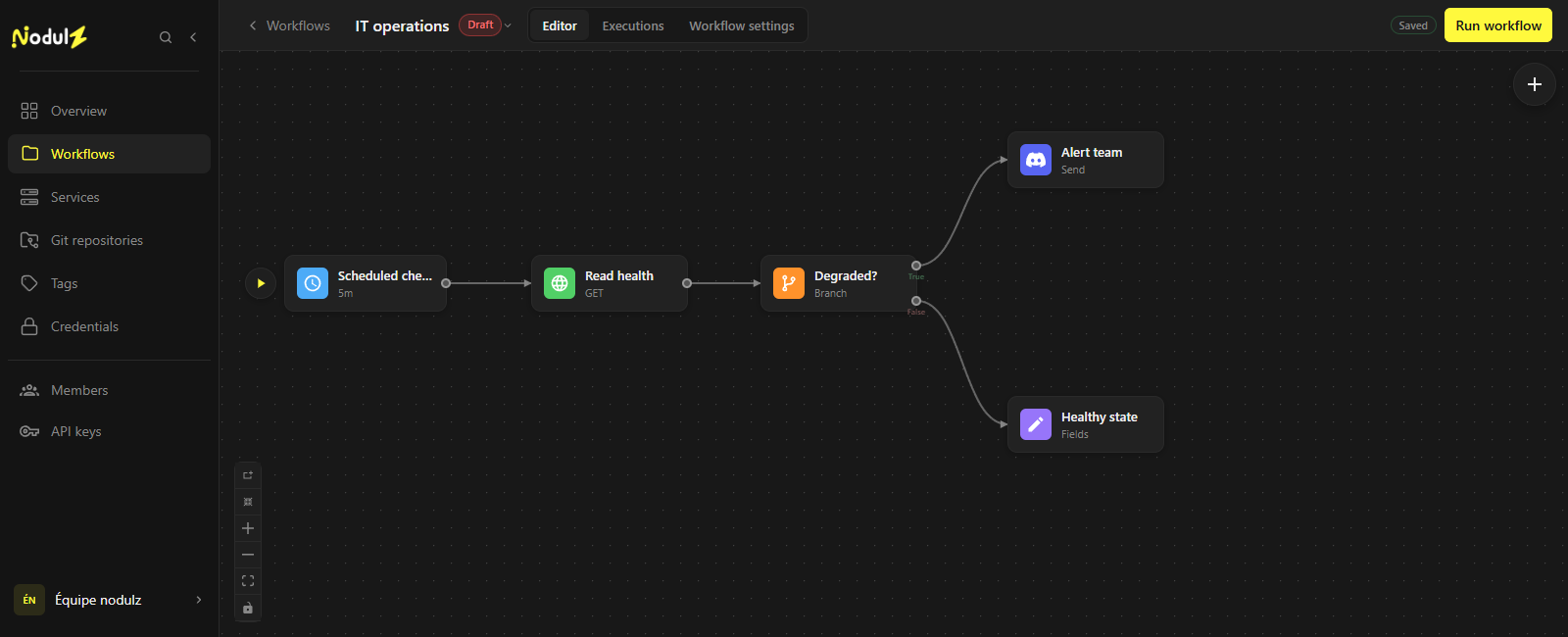
The branches separate an alert from a healthy state. Editor capture of an illustrative workflow that has not been executed.
Scroll the capture horizontally to follow the full workflow.
What happens at each step.
- 1
Scheduled check
Choose a check frequency suited to your application.
- Data used
- Your team’s cadence, for example one check every five minutes.
- What the step passes on
- A new service check.
- 2
Read health
Call the health endpoint and retrieve its content. Configure network error handling as well.
- Data used
- Health endpoint and HTTP check parameters.
- What the step passes on
- Service response, for example its name and an ok or degraded status.
- 3
Service degraded?
Compare the returned state with your team’s criterion to select the alert branch.
- Data used
- Returned status and your team’s condition.
- What the step passes on
- True branch: alert. False branch: retain a healthy state without sending a message.
- 4
Alert team
Send the service name, its state and useful diagnostic information.
- Data used
- Service name and details of the check reporting degradation.
- What the step passes on
- A notification request sent to the configured Discord webhook.
Example workflow: adapt connections, parameters and rules to your environment. The data shown is illustrative.
What this workflow brings.
The check and its alert rule become visible in one workflow. The notification includes check data to give the team a starting point for diagnosis.
- An explicit alert rule next to the check.
- A notification tied to a specific response and service.
- A healthy path that avoids adding channel noise.
Keep control of the process.
Set timeouts and alert frequency for your service. Handling missing responses and limiting notifications require configuration for your context.
Explore available nodes