
An incoming request. Context to act on.
Read support emails, suggest a category and summary with AI, then send that information to your ticketing tool through its API.
For teams in support, customer service and operations.
The day-to-day need.
Requests arrive in a shared inbox. The team reads each message, identifies the topic and rewrites the context before creating a useful ticket.
- Reading and rewriting each message takes time before handling the request.
- A category without the original message can route the request to the wrong person.
- AI suggestions must remain reviewable before they are used to answer the customer.
Example: prepare requests from a support inbox
When an email arrives, suggest a category from your support topics and summarize the request. Create a ticket through HTTP with those suggestions and the original message for the team to review.
- Without a workflow
- Someone opens the email, selects a category, writes a summary and copies the message into a ticket.
- With nodulz
- The ticket is prepared with a suggested category and summary; the original message accompanies them for review.
How nodulz solves the problem.
nodulz uses AI to prepare the work while keeping a source the team can reread. Classification and summarization remain distinct steps with their own instructions.
Categories defined by the team
The Classification node receives allowed topics such as billing, access and incidents. The model suggests a category from the message; your support team controls the list.
A summary suited to the task
The Summary node receives the original message and instructions on facts to retain: the problem, affected service and customer request. It does not replace the source.
A ticket ready for review
An HTTP request creates the ticket with the message, category and summary. The team reviews these suggestions in its support tool before replying or reassigning the request.
From trigger to outcome.
Incoming email · AI classification · AI summary · Ticket API
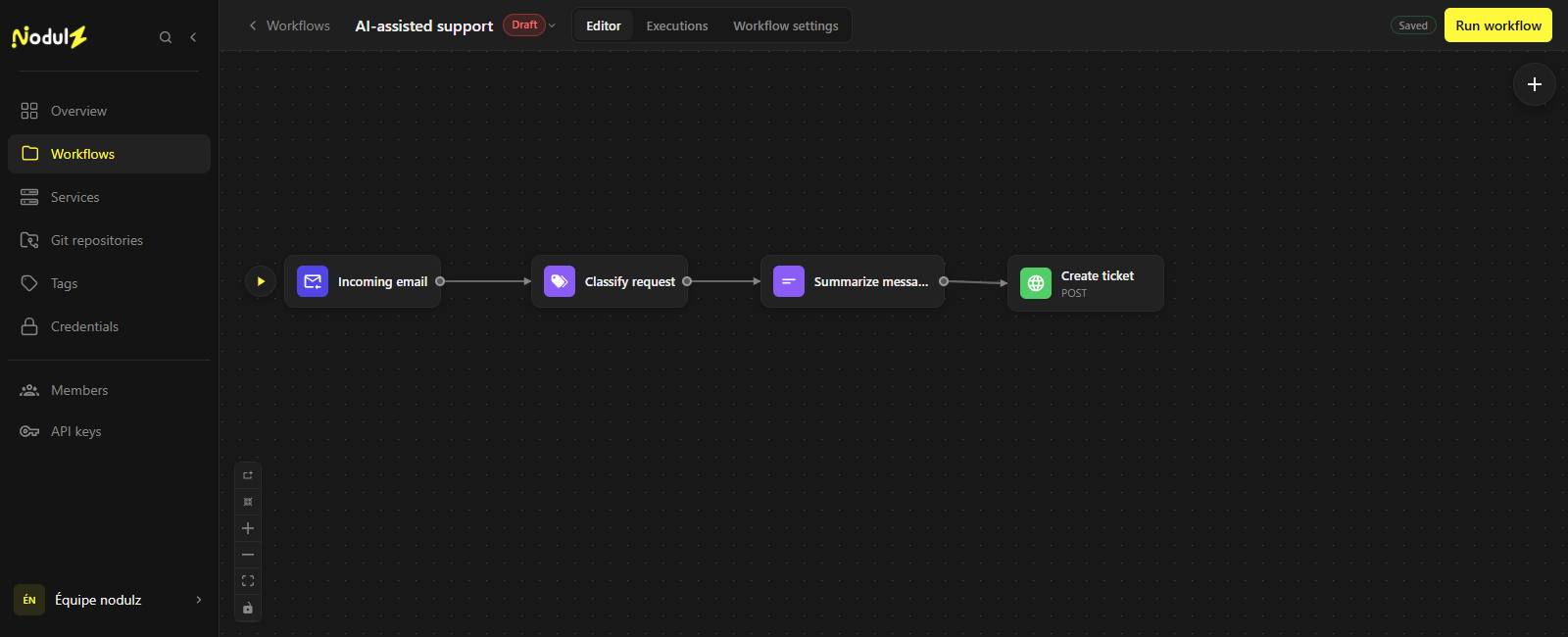
AI prepares the context; the support tool keeps the original request. Editor capture of an illustrative workflow that has not been executed.
Scroll the capture horizontally to follow the full workflow.
What happens at each step.
- 1
Incoming email
Retrieve the message from the configured support mailbox.
- Data used
- Support message: subject, sender and body.
- What the step passes on
- The message used to prepare the ticket.
- 2
Classify request
Define your categories and use your chosen model to suggest a classification.
- Data used
- Email text, category list and model instructions.
- What the step passes on
- A suggested category, such as access, for the team to review.
- 3
Summarize message
Prepare a summary that retains the facts needed to handle the request.
- Data used
- Original message and instructions on useful support facts.
- What the step passes on
- A suggested request summary, without sending a customer reply.
- 4
Create ticket
Create the ticket through your tool’s API with the category, summary and source message.
- Data used
- Original message, category and summary formatted for the API.
- What the step passes on
- Ticketing tool response, including the created ticket’s ID.
Example workflow: adapt connections, parameters and rules to your environment. The data shown is illustrative.
What this workflow brings.
Requests arrive in the support tool with prepared context. The team keeps the original message and reviews the suggestions before replying.
- Prepared context when the ticket arrives.
- Classification instructions separate from summary instructions.
- The source message retained to check the AI suggestions.
Keep control of the process.
Choose the provider and model for your data constraints. Categories and summaries are suggestions to review; this scenario does not send automatic customer replies.
Explore available nodes