
From business record to delivered document.
Receive a business event, retrieve its data, generate a PDF and archive it before sending it by email.
For teams in administration, finance and operations.
The day-to-day need.
Confirmations and reports are often assembled manually: find the information, fill a template, export the document, then store and send it.
- Copying order items into a template introduces data entry errors.
- The sent document and archived document can differ when they are prepared separately.
- Without a shared record ID, finding the PDF and its send request becomes a manual search.
Example: an order confirmation
A confirmed order triggers the workflow with its ID. Nodulz retrieves its items from PostgreSQL, generates the PDF confirmation, stores it in your S3 bucket and prepares the customer email.
- Without a workflow
- The team reads the order, fills a template, exports a PDF, stores it and prepares an email.
- With nodulz
- The order ID connects the source data, PDF generation, archiving and send request in one path.
How nodulz solves the problem.
nodulz keeps the business record as the common thread. The document is generated from retrieved data, then the same file passes to the archive and email steps.
Load the right record
The webhook receives an order ID. A PostgreSQL query retrieves the required details; the triggering event does not need to contain the entire record.
Compose a document from data
The PDF node uses your template and workflow expressions to display contact details and order items. Content, layout and file name remain configurable.
Reuse the same file
Amazon S3 archives the PDF under an order-related key. The Email node attaches that document; an archive failure should be handled before proceeding according to your rules.
From trigger to outcome.
Webhook · PostgreSQL · PDF · Amazon S3 · Email
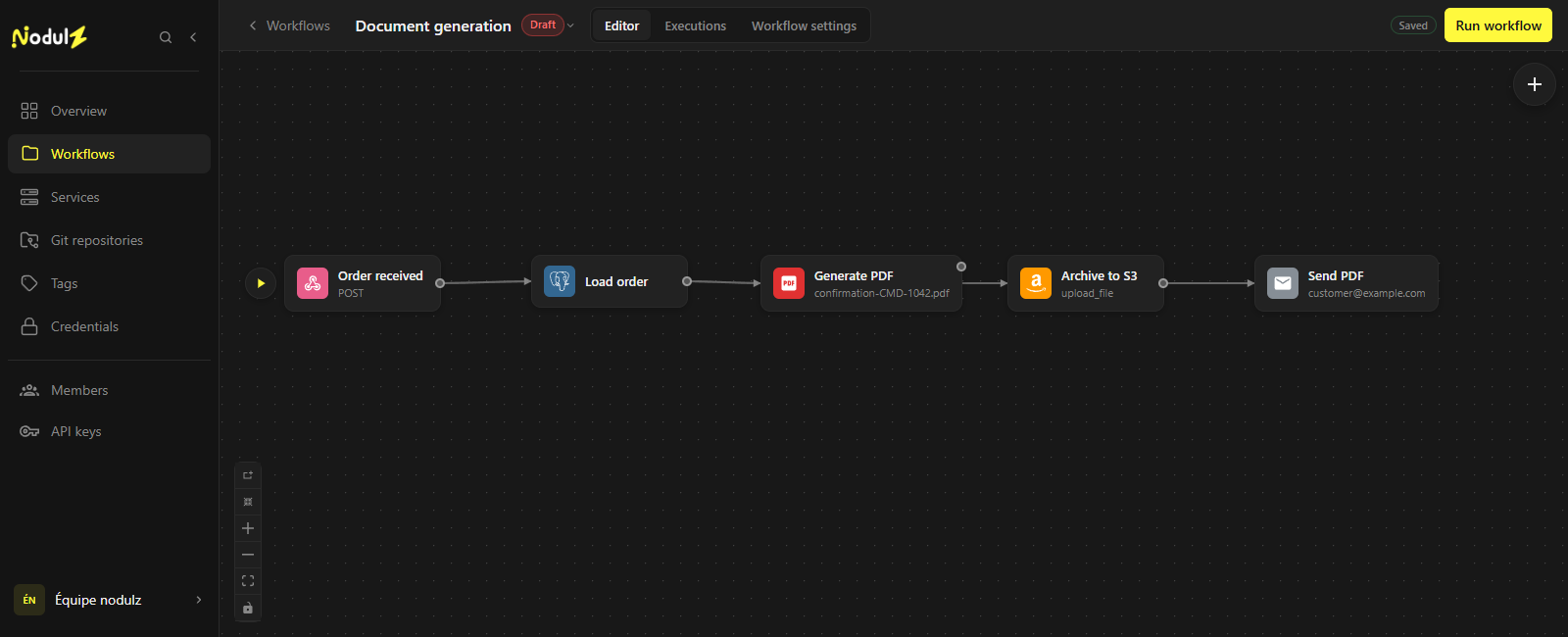
The order becomes a document; the same PDF is archived and sent. Editor capture of an illustrative workflow that has not been executed.
Scroll the capture horizontally to follow the full workflow.
What happens at each step.
- 1
Order confirmed
Receive the order ID from your business application.
- Data used
- Business event with an identifier, for example order_id: CMD-1042.
- What the step passes on
- The order context passed to the rest of the workflow.
- 2
Load order
Load the contact details and order items needed for the document.
- Data used
- Order ID and a parameterized SQL query.
- What the step passes on
- Customer details and order items used by the template.
- 3
Generate PDF
Build the document using your template and order data.
- Data used
- Document template and order data.
- What the step passes on
- An order-named PDF, for example confirmation-CMD-1042.pdf.
- 4
Archive to S3
Archive the PDF in the bucket and path you configured.
- Data used
- PDF, bucket and order-related storage key.
- What the step passes on
- Result of storing the document in the configured archive.
- 5
Send PDF
Send the confirmation with the document attached through your email connection.
- Data used
- Recipient, email content and attached PDF.
- What the step passes on
- Result of the send request through the email connection.
Example workflow: adapt connections, parameters and rules to your environment. The data shown is illustrative.
What this workflow brings.
Generation, archiving and sending share one visible path. You can inspect the data used to assemble each document.
- A document generated from the record’s data.
- The same PDF for the archive and attachment.
- A processing path tied to the order ID.
Keep control of the process.
Your template, file name and recipients remain under your control. Protect the webhook and choose a bucket access policy suited to the document’s data.
Explore available nodes